ご相談者
ご相談内容:
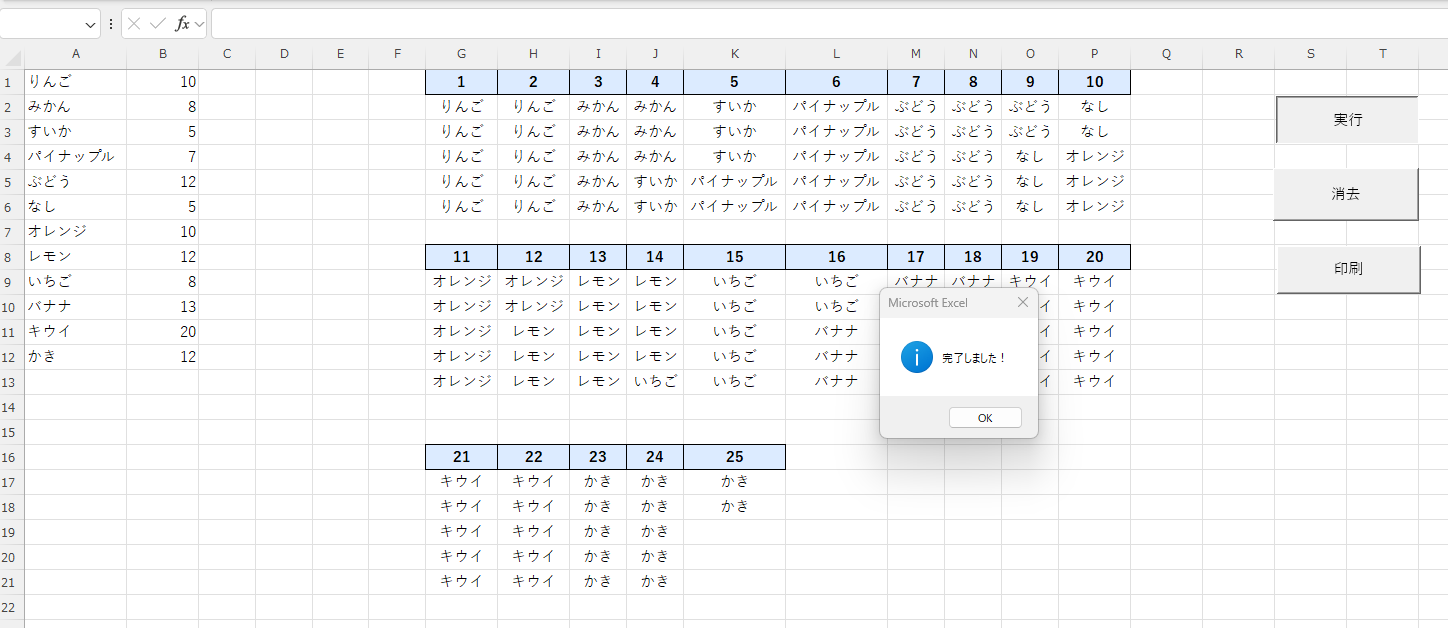
①展示場の作品配置図を作成したい。
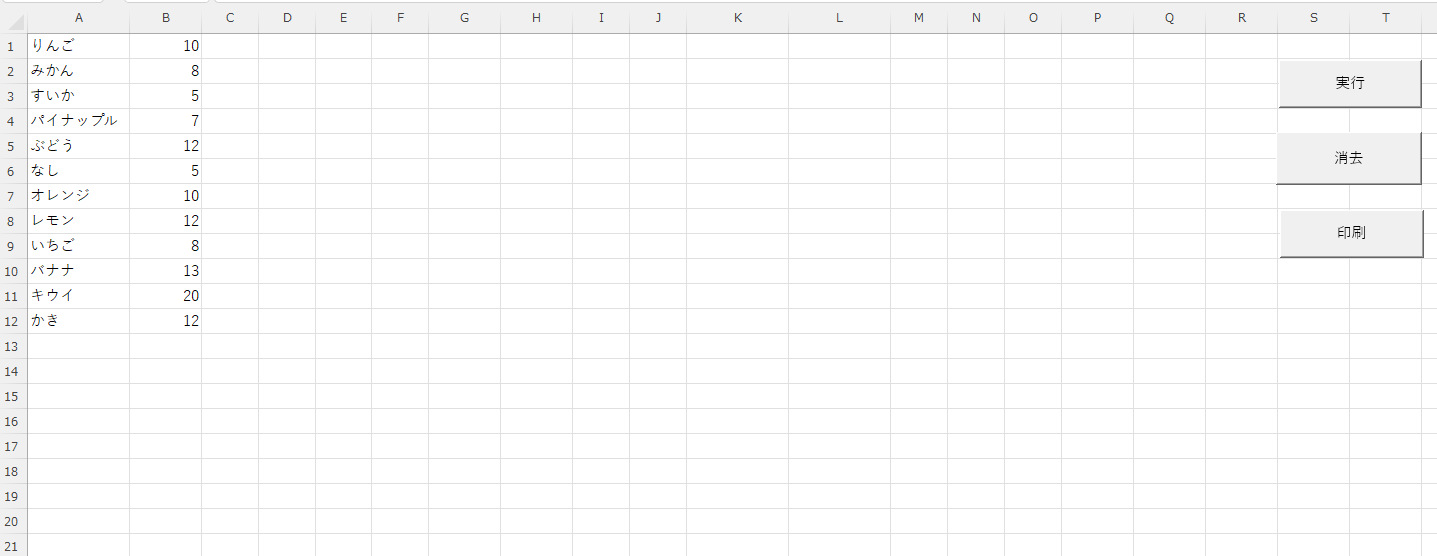
②A列にグループ名、B列に各グループの展示点数が入力されている。
③各グループ名を、展示点数分だけ配置図に展開する。
④配置順は「縦5点×横は必要数」で、上から下、左から右の順に並べる。
⑤各列の先頭には、左から順に通し番号(1、2、3…)をふる。
⑥横方向は最大10列までとし、10列ごとに下段へ折り返す。
⑦展示点数はグループごとに異なり、不定である。
①展示場の作品配置図を作成したい。
②A列にグループ名、B列に各グループの展示点数が入力されている。
③各グループ名を、展示点数分だけ配置図に展開する。
④配置順は「縦5点×横は必要数」で、上から下、左から右の順に並べる。
⑤各列の先頭には、左から順に通し番号(1、2、3…)をふる。
⑥横方向は最大10列までとし、10列ごとに下段へ折り返す。
⑦展示点数はグループごとに異なり、不定である。

回答者
松本トレーナー@ひばり教室
関数だと式が見にくくなりメンテが悪いのでマクロをつかいました。「すべて選択 → コピー → ExcelVBA」でお使いください。
関数だと式が見にくくなりメンテが悪いのでマクロをつかいました。「すべて選択 → コピー → ExcelVBA」でお使いください。
Sub OrganizedRepeatText()

    ' --- 初期設定とエラーチェック ---
    Dim i As Long, j As Long, lastRow As Long
    Dim targetRow As Long, targetCol As Long
    Dim count As Long, columnNumber As Long
    Dim totalDataCount As Double
    Dim startRow As Long
    Dim currentBVal As Variant

    lastRow = Cells(Rows.Count, 1).End(xlUp).Row
    If lastRow < 1 Then Exit Sub

    totalDataCount = Application.WorksheetFunction.Sum(Range("B1:B" & lastRow))
    If totalDataCount <= 0 Then MsgBox "B列に有効な数値がありません。", vbExclamation Exit Sub End If Application.ScreenUpdating = False ' --- リセット処理 --- Range(Columns(7), Columns(Columns.Count)).Clear ' --- 変数初期化 --- targetCol = 7 ' G列 startRow = 1 ' ヘッダー行 targetRow = 2 ' データ開始行 columnNumber = 1 ' ヘッダー連番 count = 0 ' 累計件数 Call ApplyHeaderStyle(Cells(startRow, targetCol), columnNumber) ' --- メイン処理 --- For i = 1 To lastRow currentBVal = Cells(i, 2).Value If IsNumeric(currentBVal) And currentBVal > 0 Then

            For j = 1 To Int(currentBVal)

                With Cells(targetRow, targetCol)
                    .Value = Cells(i, 1).Value
                    .HorizontalAlignment = xlCenter
                End With

                count = count + 1
                targetRow = targetRow + 1

                If count >= totalDataCount Then GoTo Finish

                ' 5件ごとに次の列へ
                If count Mod 5 = 0 Then

                    columnNumber = columnNumber + 1

                    ' P列(16)まで来たら下段へ
                    If targetCol >= 16 Then
                        targetCol = 7

                        If startRow = 1 Then
                            startRow = startRow + 7
                        Else
                            startRow = startRow + 8
                        End If
                    Else
                        targetCol = targetCol + 1
                    End If

                    targetRow = startRow + 1
                    Call ApplyHeaderStyle(Cells(startRow, targetCol), columnNumber)

                End If

            Next j

        End If

    Next i

Finish:

    Columns("G:P").AutoFit
    Application.ScreenUpdating = True

    MsgBox "完了しました!", vbInformation

End Sub


' --- ヘッダー用書式設定 ---
Private Sub ApplyHeaderStyle(rng As Range, num As Long)

    With rng
        .Value = num
        .HorizontalAlignment = xlCenter
        .Interior.Color = RGB(220, 235, 255)
        .Font.Bold = True
        .Borders.Weight = xlThin
    End With

End Sub
1時間目は処理内容の確認に、2時間目は操作のご説明に使わせていただきました。ですので、あと2時間ご体験いただけます。
マクロを使えば、これまで1時間かかっていた作業も、あっという間に終わらせることができます。
さらに、AIを活用すれば、そのマクロ作成も数分で可能です。
とはいえ、独学では少しハードルが高く感じることもありますよね。
そんな時はピーシーライブにまずはお気軽にご相談ください。
さらに、AIを活用すれば、そのマクロ作成も数分で可能です。
とはいえ、独学では少しハードルが高く感じることもありますよね。
そんな時はピーシーライブにまずはお気軽にご相談ください。